A question, a problem, a message to report: write to contact@solobisoft.com. A real person answers, usually within the day.
Getting started
One channel, one button. Three moves are all it takes.
-
1
Choose where to talk
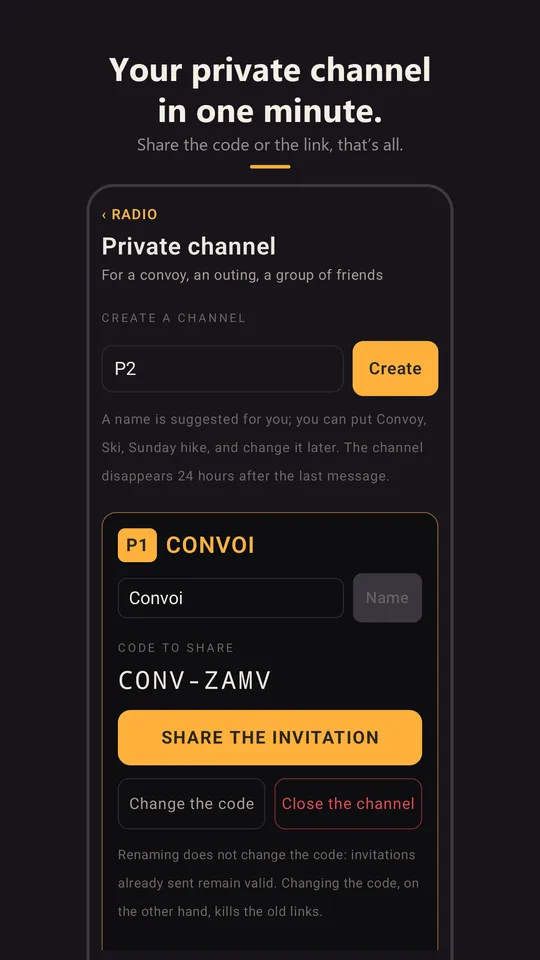
As a group: create your channel in the Channels tab and send the link. Whoever opens it hears you, wherever they are. On your own: listen to 19, the road channel, within the range you choose (an approximate location is needed).
-
2
Hold to talk, let go to listen
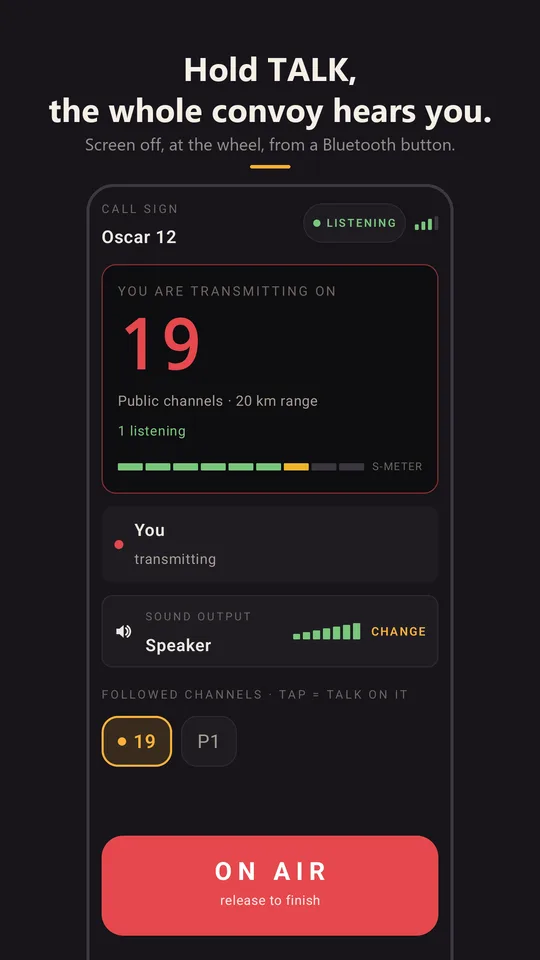
Keep your finger on TALK the whole time you're talking, then let go: one person talks at a time, just like CB. At first, a bubble above the button reminds you, then disappears once you've got the hang of it. To check that everything works, the radio check plays your own message back to you: the radio offers it when nobody is in range, and one tap takes you back to your channel once it's “loud and clear”.
-
3
Leave the radio listening
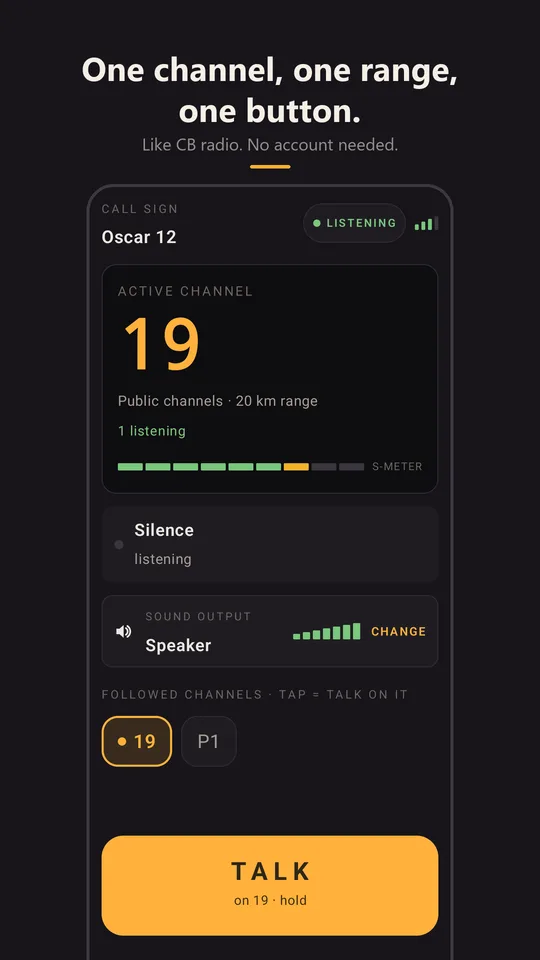
Messages arrive even with the screen locked, on the speaker or through the car's Bluetooth. What you missed waits for you for 24 hours in Messages, transcribed. And when you arrive somewhere, tap the channel number: what was said there in the last hour, around you, plays back.
Report a message or a radio
In the app, Messages tab: press and hold the message, then Report… and choose the reason. The message and its transcript reach us; the person doesn't know who reported it. The message leaves your list immediately. We review every report within 24 hours, delete the offending content and ban radios that break the terms of use.
To stop hearing someone right away, without waiting: same gesture, then Stop hearing… You can undo it in Settings › Private conversations › Blocked devices.
On an event channel (rally, race, festival), the organisers moderate: they receive the reports and can mute a radio.
Frequently asked questions
Before you install
Is it real CB? No, and that's deliberate. CitizenBand takes what makes CB (a channel, a range, a button, one person talking at a time) onto the mobile network. No antenna, no licence, no equipment; in return, you need signal (4G or Wi‑Fi), at least now and then.
Is it free? Yes: the app is free, with no account and no ads. Event organisers (rally, race, convoy) have a console of their own; nothing changes for participants.
Do I need to create an account? No. You choose a call sign, that's all: no email, no number, no password.
Who hears me when I talk on a public channel? Every radio listening to the same channel within the range you chose: 5, 20, 50 or 100 km around you. Beyond that, silence, just like on the air. On a private channel, only those who received the link.
Why channel 19? Tradition: it's the truckers' channel, the one where you ask “how's the road ahead?”. The other channels, 1 to 40, are free; 9 stays reserved for emergencies between users.
Does it work without signal? You can still talk: the message is kept with its time and place, and goes out when the network comes back. What was said during the outage is played back to you afterwards, marked “delayed”.
Does it work abroad? Yes, wherever the phone has signal. The app speaks 26 languages, and every message can be translated on request.
On which devices? Android (phone, Android Auto, Wear OS watch) and iPhone (CarPlay, Apple Watch). A channel brings both together, with no difference.
Channels
I can't hear anyone on 19. Public channels carry within a range (5 to 100 km) around you: if nobody is listening within that range, there's silence, just like on the air. Widen the range on the Channels screen, or create a private channel and send the link to the people travelling with you. Tap the channel number to play back what was said there in the last hour; and to check that everything works, the radio check, offered when nobody is in range, plays your own message back to you.
Public channels are greyed out. An approximate location is needed: allow location in Settings › CitizenBand › Location, ideally “Always”, so that the radio can locate itself when a message wakes it with the screen off.
What is the range for? To hear the people who matter to you: those in your traffic jam, not those at the other end of the country. Start at 20 km; widen it if it's silent, narrow it if there's too much talk.
How do I create a channel for my group? In the Channels tab, create a private channel, then send the link or show the QR. Whoever opens it hears you, wherever they are: the range doesn't apply to private channels.
How long does a private channel last? You choose when you create it: an outing (24 h), a stay (7 days) or a group (30 days), counted from the last message. You're warned before it ends, and any member can extend it; if it has gone, Recreate makes it again with the same name. The creator can also require their approval for each newcomer.
Can I follow several channels at once? Yes, that's the scan: choose the channels to follow, and the radio switches to whichever one is talking, with a priority channel if you want one.
What is the radio check? A test channel that answers “loud and clear” by playing your own message back to you. It checks microphone, sound and network when nobody is in range.
Is channel 9 the emergency services? No. Channel 9 is reserved for emergencies by tradition, but no emergency service listens to it. In an accident, call 112.
Someone is talking just for the sake of it. What can I do? In Messages, press and hold their line: Stop hearing… cuts them off for you right away; Report… lets us know. On an event channel, the organisers moderate.
Sound: headset, microphone, car, watch
I have a headset and a hand microphone connected at the same time: where does the sound come out, where do I talk? The radio follows three rules, with nothing to set up:
- You talk into what you press. The hand microphone's button uses its microphone; the watch, the watch's microphone; the screen, the microphone chosen in Sound output (by default, the Bluetooth headset if there is one).
- You hear through the device made for it. A headset, a hand microphone with a speaker, a wired kit or the car radio always come before the phone's speaker and before the watch.
- The watch is the ear only as a last resort. With no dedicated output, the sound goes to the last device touched: the watch if you just pressed it, otherwise the phone. The watch vibrates at the start and end of the message if it's the one you touched last.
To combine them differently, for example listening in earphones and talking into the hand microphone: Radio › Sound output lists every connected Bluetooth device, once for sound, once for the microphone. The chosen microphone is only taken while you transmit; your calls always ring wherever the phone decides. On iPhone, Change… opens the iOS picker.
The start of the message is cut off in my Bluetooth headset. Some headsets take half a second to open. The radio anticipates this: it wakes the headset before playing and adds a short silence. If it still cuts off, the headset is probably in call mode (hands-free): switch it to music mode in its settings, or choose it in Sound output.
The sound is quiet. The radio's volume follows the phone's buttons while a message is playing. The output (speaker, Bluetooth, CarPlay) is chosen under “who's talking” on the Radio screen.
I don't receive anything with the screen locked. Check that the radio is “listening” (badge at the top of the screen) and that notifications are allowed. On iPhone, CitizenBand uses iOS Push to Talk: the message plays on the speaker even when locked.
Can I talk using my headset's button or a Bluetooth button? Yes. Motorcycle intercom headsets (Sena, BMW): hold the middle button for 2 seconds. Off-the-shelf PTT buttons and microphones (PTT‑Z01, AINA PTT Voice Responder, Inrico B01/B02): pair them in Settings › Talk button, then one press to talk. On iPhone, the Inrico's buttons aren't recognised: voice and sound work, the keys don't.
Why does my hand microphone have a red button? It's the microphone's emergency call: it switches the radio to channel 9 and talks on it. No emergency service listens there: in an accident, call 112.
What about in the car? Android Auto and CarPlay show the radio on the car's screen: the channel, the TALK button, missed messages. Sound comes out through the car, and your voice is picked up by its microphone. On Android Auto, the CitizenBand screen only appears if the app came from the Play Store.
Is the radio's volume the same as the music's? On Android, no: the volume buttons adjust the radio while a message is playing, and the music goes back to its level afterwards. On iPhone, it's the device volume.
And on the watch? Wear OS watch or Apple Watch: TALK button on your wrist, missed messages to listen to, switching the radio on from the watch. The watch speaks the radio's language. It installs from the same store as the phone.
Messages
I missed a message. It waits for you in Messages for 24 hours, transcribed.
Who writes the messages? CitizenBand's server, automatically, in the language spoken; translation is on request. Your voice never goes to any outside provider.
What is the keyword assistant? You give it words that matter to you (your race number, a motorway exit, a first name); when one of them is said on a channel, it lets you know, anything from a discreet note to an audible alert, your choice.
What is “Tell me when it comes alive”? With the radio off, a notification when a channel you follow comes alive near you. One gesture switches it back on.
Battery and privacy
Does it drain the battery? The radio listening with no traffic costs a fraction of a percent per hour; what uses power is the screen being on and transmitting. Judge by the Battery page in the phone's settings, not by overall drain. On Android, allow CitizenBand to be exempt from battery optimisation, otherwise the system may put the radio to sleep.
Where does my location go? The server receives an approximate area of a few kilometres, never your coordinates, just long enough to know who is in range. The one exception: an event you join that tracks its participants, if you accept; your precise location then goes only to its organisers, and stops when you leave the event.
Who keeps my messages? The server, for 24 hours, encrypted, so that those who were out of signal can play them back. Then they disappear.
How do I delete my data? There's no account: uninstall the app, and your messages delete themselves within 24 hours. The details are on the Privacy page.
For organisers
I run a rally, a race, a convoy: how do I get set up? The organiser console creates your channels (race control, support, crews), sets their area along the route and invites participants by email, SMS or QR at the briefing. Nothing else to install. Write to us: contact@solobisoft.com.
A participant doesn't respect the channel. From the console, the organisers can mute a radio, talk to it privately or exclude it. Participants' reports reach them.
Organising an event
Rally, race, club ride, festival: the organiser console creates your channels and your zone. Write to us at contact@solobisoft.com.
Publisher: Solobisoft, Paris. Last updated: 7 October 2026.